You need to test, we're here to help.

You need to test, we're here to help.
Showing posts with label TxEQ. Show all posts

13 February 2023

Making New PCIe 6.0 Transmitter Equalization Measurements with Your Oscilloscope

Figure 1. Transmitter equalization test results for preset Q1.

PCI Express® 6.0 achieves its 64-GT/s data rate, double that of PCIe® 5.0, by moving from non-return-to-zero (NRZ) signaling to four-level pulse-amplitude-modulation (PAM4) signaling. This results in the need for more complex algorithms for voltage and timing measurements.

The latest release of SDAIII software for Teledyne LeCroy oscilloscopes lets you easily measure response at different transmitter equalization presets to confirm that Tx EQ is achieving the specified levels prior to taking your DUT for compliance testing. The Tx EQ measurement feature works with NRZ signals and, if you have the additional SDAIII-PAMx option, with PAM3 and PAM4 signals, too.

Transmitter Equalization Coefficients and Presets Measurement

In PCIe 6.0, transmitter equalization measurements are performed on the new PAM4 Compliance Pattern signal using the AC method that was first introduced in PCIe 5.0.

09 August 2021

Debugging Dynamic Link Behaviors with CrossSync PHY for PCIe

Figure 1: These upstream lanes show unexpected equalization behavior. If you only had the electrical signals to work with, how would you begin debugging them?
Figure 1: These upstream lanes show unexpected equalization
behavior. If you only had the electrical signals to work with,
how would you begin debugging them?
Recent generations of PCI Express® rely heavily on the link equalization process to support signal integrity at bit rates of 8, 16 or 32 Gbps. In Phase 1, both sides of the link exchange TS1 ordered sets to establish an operational link. In Phase 2, the upstream port requests the downstream port to configure its transmitter equalization to compensate for the link channel. In Phase 3, the opposite happens, and the downstream port requests the upstream port to configure its transmitter equalization. 

At PCI Express compliance events, or when doing pre-compliance testing in the lab, a transmitter link equalization test is performed to determine whether a device is capable of correct link equalization in isolation. A piece of test equipment, usually a protocol-aware BERT, acts as the link partner for the device under test. The BERT requests specific preset changes from the device, in response to which the device (in theory) changes its preset to provide the correct channel compensation. The changes are captured by an oscilloscope, which is capable of visualizing the transmitter equalization changes in the electrical layer and measuring first of all, if they happen quickly enough, and secondly, if the device actually changed to the preset levels requested, which occur in a known sequence. 

But what happens when you suspect "weird" equalization behavior in a live link between two devices—for example, something off with the upstream equalization in Phase 3?  How would you capture that to begin debugging the problem? Where would you look for a clue as to what is happening?

17 January 2018

Some More PCIe 3.0 Test Examples (Part II)

This shows how a PeRT 3 state-machine log can be invaluable in diagnosing timeouts in requests for presets
Figure 1: This shows how a PeRT 3 state-machine log can be invaluable
in diagnosing timeouts in requests for presets
Continuing on from our last post, let's look at some more examples of common PCIe 3.0 test scenarios and how a well-equipped PCIe 3.0 testbench would approach them. Recall, if you will, that such a testbench would comprise a real-time digital oscilloscope of suitable bandwidth (such as Teledyne LeCroy's SDA830Zi-B oscilloscope), a protocol-enabled receiver tester (such as Teledyne LeCroy's PeRT 3 Phoenix System), and software that enables simultaneous, correlated views of the protocol and physical layers (such as Teledyne LeCroy's ProtoSync software).

Some PCIe 3.0 Test Examples (Part I)

Protocol and electrical views of  slow electrical response to a preset request
Figure 1: Protocol and electrical views of
slow electrical response to a preset request
We took a tour of a typical PCIe 3.0 testbench setup in a recent post. Now, let's see that testbench in action with some application examples of some common bad behavior one might encounter from a PCIe 3.0 channel. These include: slow electrical response, slow protocol response, and so on.

16 January 2018

An Under-The-Hood View of PCIe 3.0 Link Training (Part II)

A diagrammatic view of the PCIe 3.0 dynamic link training process
Figure 1: A diagrammatic view of the
PCIe 3.0 dynamic link training process
Our last post in this series began examining the recovery.equalization process of PCIe 3.0 dynamic link training, beginning with Phases 0 and 1 of the process (Figure 1). Next, we will move on to take a closer look at Phases 2 and 3, where we'll see what can happen with devices in which the algorithms are not up to par. Namely, issues such as packet errors, dropped packets, and link retraining at lower data rates than 8 Gb/s.

14 November 2014

An Under-the-Hood View of PCIe 3.0 Link Training (Part I)

An overview of the elements of PCIe 3.0 dynamic link equalization
Figure 1: An overview of the elements of PCIe 3.0
dynamic link equalization
Now that we've looked at the basics of PCIe 3.0 dynamic link equalization and at some of the particulars of de-emphasis and preshoot, it's time to dive a little deeper into what actually happens in the link training process. It all happens in the blink of an eye but there's enough going on to warrant some dissection.

10 November 2014

PCIe 3.0 Dynamic Link EQ: De-Emphasis, Preshoot, Cursors, and Presets

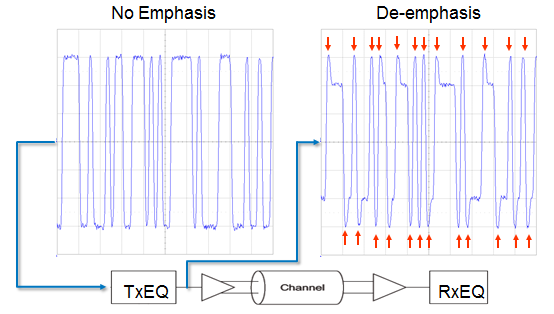
De-emphasis, a key transmit-side equalization technique for PCIe 3.0, boosts high-frequency content
Figure 1: De-emphasis, a key transmit-side equalization
technique for PCIe 3.0, boosts high-frequency content
In an earlier post, we looked at some of the basics of dynamic link equalization for PCIe 3.0, and in particular the reasons why it's not only necessary but mandated by the PCI-SIG for compliance testing. Essentially, the boost in data rates from 5 GT/s in PCIe 2.0 to 8 GT/s in PCIe 3.0 wreaked havoc in terms of signal integrity in the channel. The solution is found in equalization both before (TxEQ) and after (RxEQ) the channel.

06 November 2014

The Hows and Whys of PCIe 3.0 Dynamic Link Equalization

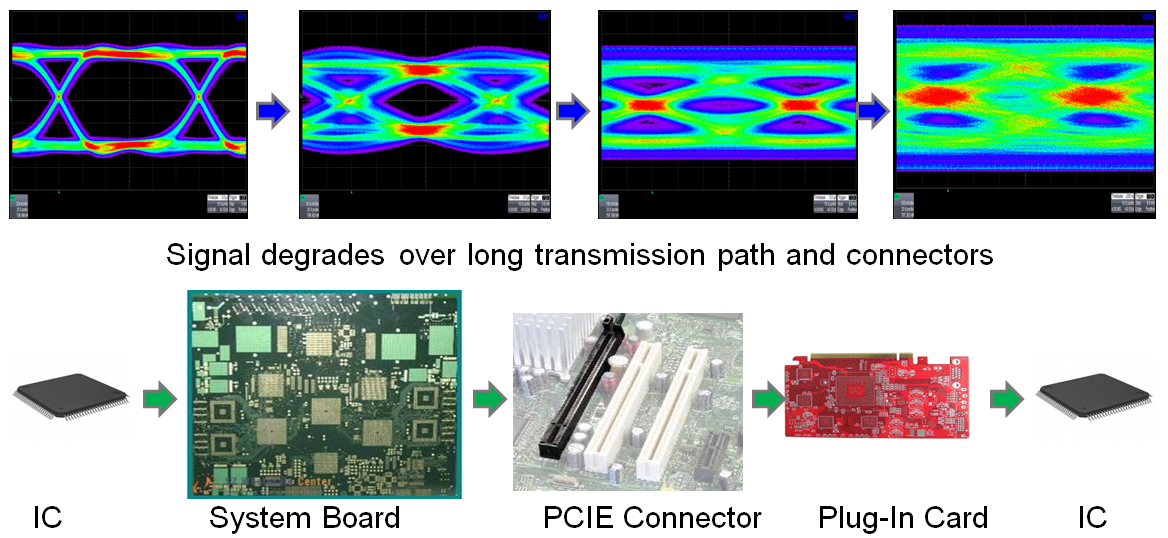
SI problems are the root cause for dynamic link equalization in PCIe 3.0
Figure 1: SI problems are the root cause for
dynamic link equalization in PCIe 3.0
If you're designing a computer peripheral these days, chances are that you'll use the Peripheral Component Interconnect Express (PCIe) protocol for communication between the device and the host system. With the emergence of PCIe, a bunch of older bus standards were kicked to the curb. PCIe itself became the basis for more specialized standards, most notably ExpressCard for laptop expansion cards and SATA Express for storage interfaces.