You need to test, we're here to help.

You need to test, we're here to help.
Showing posts with label serial decode. Show all posts

27 February 2023

The Case for CAN XL in 10 Mbit/S In-vehicle Networks

CAN XL has recently emerged as a contender in the 10 Mbit/S in-vehicle network space, along with 10Base-T1S Automotive Ethernet. What does CAN XL bring to earn its place on the vehicle bus?

CAN XL builds upon the foundation of CAN and CAN FD, both protocols with a long history in the automotive industry. Figure 1 summarizes the characteristics of the three CAN variants.
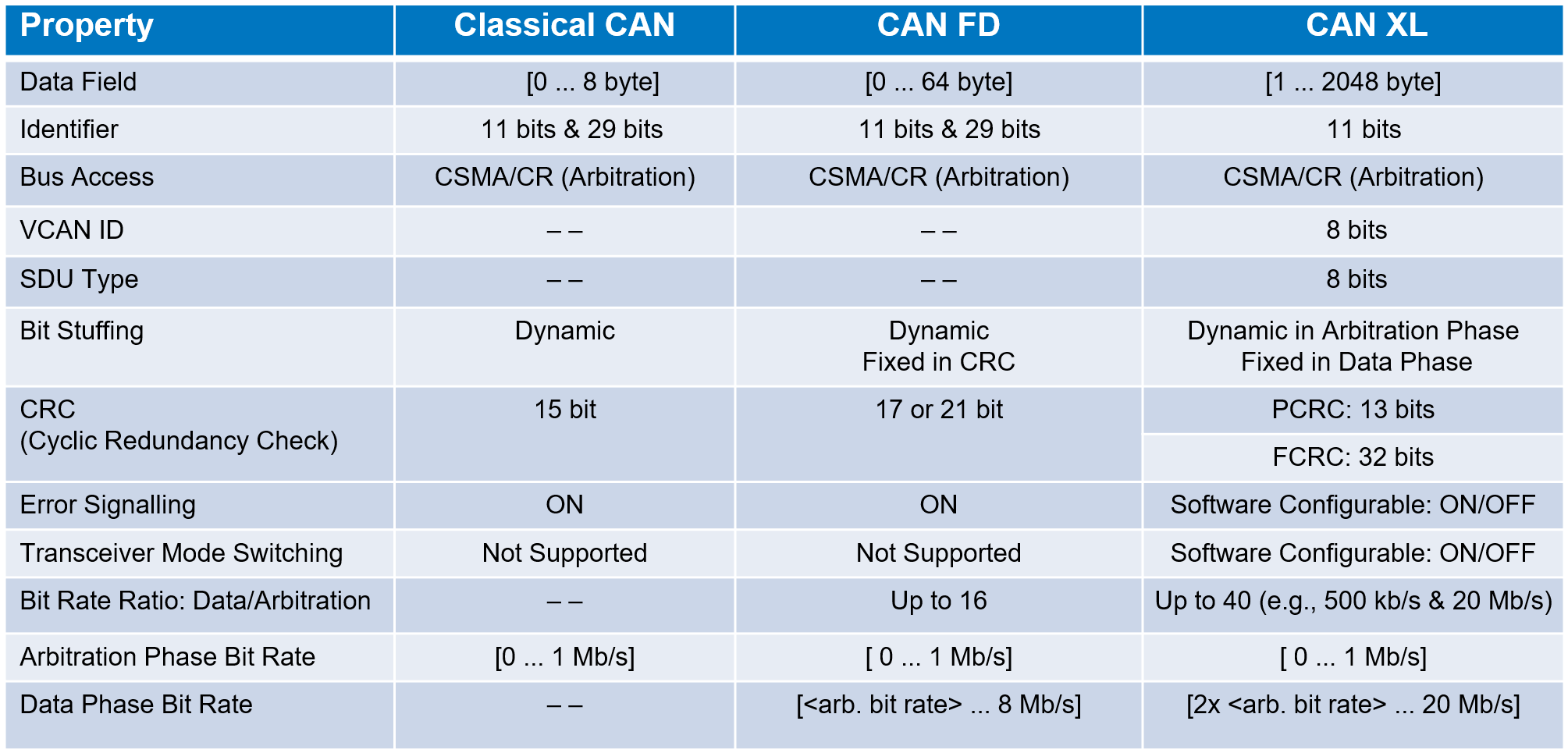
Figure 1. A comparison of the characteristics of CAN, CAN FD and CAN XL
Figure 1. A comparison of the characteristics of CAN, CAN FD and CAN XL.

CAN XL increases throughput with a Fast Mode bit rate of 20 Mbit/S in the data phase, while it operates at 1 Mbps in the arbitration phase (those fields other than data). Another feature contributing to the improved bandwidth of CAN XL is the increased data field maximum length of 2048 bytes compared to 64 bytes for CAN FD and 8 bytes for classic CAN.

21 November 2022

Oscilloscope Serial Data Measurements and DAC: Trigger, Decode, Measure/Graph and Eye Diagram Software

Table of serial bus measurement parameters
Figure 1. Serial bus measurements made available
with "TDME" and "TDMP "decoder options.
All Teledyne LeCroy oscilloscopes support a rich set of standard waveform measurement parameters, but the installation of any "TDME" or "TDMP" serial decoder software option adds special parameters designed for measuring serial data buses. Besides automating the measurement of serial bus timing, these parameters allow you to access encoded serial data and extract it to analog values for what is essentially a Digital-to-Analog Converter (DAC)!

What’s in a Name?

Teledyne LeCroy has adopted the convention of using a key in the name of our serial trigger and decode products that tells you what capabilities they offer.  The “ME” or “MP” in the name of a Teledyne LeCroy serial decoder option (e.g., CAN FDbus TDME or USB4-SB TDMP) refers to "Measure/Graph and Eye Diagram" or "Measure/Graph and Physical Layer Tests." All these options include the following 10 serial bus measurements. Physical Layer Test options will also include measurements designed specifically to meet the requirements of the standard.

11 November 2022

Serial Trigger, Decode, Measure/Graph & Eye Diagram (TDME) Software: Oscilloscope Eye Diagrams for Debug

Eye diagrams generated from two serial decodes.
Figure 1. Two eye diagrams generated from 
three active USB serial decoders.
Click any image to enlarge it.

The eye diagram is a general-purpose tool for analyzing the signal integrity of serial digital communications signals. It shows the effects of additive vertical noise, horizontal jitter, duty cycle distortion, inter-symbol interference, and crosstalk on a serial data stream. The vertical opening of the eye is affected by these elements, as well as gain differences between devices on the bus, so that the more problems with signal integrity, the more “sleepy” the eye appears. A wide open eye is indicative of good signal integrity.

It is commonplace to use an oscilloscope with decoder software to analyze the health of serial data streams, where the combination of the electrical waveform and the link layer decoding shows if and where the protocol breaks down at the physical layer, but an eye diagram can better show the degree of signal interference that may be impacting the serial logic—especially if it could be generated for particular devices or packets.

22 March 2021

TDME Primer: Automated Timing Measurements of USB-C Protocols

Figure 1: Interleaved decoding of USB-PD and DP-AUX signals.
Increasingly, serial data analysis is analysis of the interoperability of the many protocols that must perform together within interconnects and embedded systems. Nowhere is this more true than for USB-C® devices, which we’ll focus on in this post, although these examples of cross-protocol timing measurements could apply to any two protocols supported by our TDME and DME options.

The USB-C connector packs many protocols onto one, small pin set, and maintaining signal and power integrity is a compliance challenge. Besides high-speed data delivery, USB-PD (power delivery) provides flexible power distribution, while auxiliary sideband signals, like DisplayPort™, transport video. Troubleshooting these capabilities requires the ability to measure timing between serial data packets, as well as between data packets and analog signals. 

For example, DisplayPort over USB-C (DPoC) in alternate mode (alt-mode) can manifest as an interoperability failure if there is a timing issue between alt-mode initiation and the start of DP-AUX.

08 March 2021

TDME Primer: Serial Trigger and Sequence Mode Sampling

Figure 1: Sequence mode sampling packs multiple acquisitions into memory with very little “dead time” between them.
Figure 1: Sequence mode sampling packs multiple acquisitions
into memory with very little “dead time” between them.
Sequence mode sampling, also referred to as segmented acquisition, is a sampling mode that divides the oscilloscope’s acquisition memory into a user-defined number of equal length segments. Each segment stores a single acquisition of the triggering event, with as much buffer zone as will fit into that segment, given the total number of segments requested. Only after all segments have been acquired is the data processed and displayed. 

The real power of sequence mode becomes evident when you combine it with intelligent triggers, such as the serial data triggers delivered with TDME options. 

01 March 2021

TDME Primer: Selecting Sample Rate for Serial Bus Analysis

Figure 1. Sample rate of only four sample points per bit decodes correctly and lengthens serial bus acquisition.
Figure 1. Sample rate of only four sample points per bit
decodes correctly and lengthens serial bus acquisition.
Teledyne LeCroy supports trigger, decode, measure/graph, and eye diagram (TDME) software options for over 20 serial data standards, and the list is growing. This series will address practical tips for using TDME software successfully, and showcase some examples of applying TDME capabilities to real-world problems.

Given the wide range of protocols supported, you might be curious about how to best choose the oscilloscope sampling rate for a given standard when acquiring serial data signals. The optimal sample rate is determined by three principal factors: 

1) the bandwidth of the signal being digitized by the oscilloscope’s analog-to-digital converter (ADC);

2) the desired duration of the acquisition;

3) what you are going to do with the acquisition.

10 May 2018

Debugging Ethernet, SATA, and PCIe for IoT Devices

A generic IoT block diagram shows serial-data links in blue
Figure 1: A generic IoT block diagram
shows serial-data links in blue
In our ongoing review of debugging serial-data standards for Internet of Things (IoT) devices, let's now turn to three more popular protocols: Ethernet, SATA, and PCIe. Ethernet is found in computer networking applications, while the Serial Advanced Technology Attachment (SATA) connects host bus adapters to mass-storage devices. The Peripheral Component Interconnect Express (PCI Express or PCIe) handles communication between root complexes (motherboards) and expansion-card interfaces.

04 May 2018

Debugging Low-Speed Serial Data on IoT Devices

Serial-data links handle traffic between ICs and peripheral devices in the IoT world
Figure 1: Serial-data links handle traffic between ICs
and peripheral devices in the IoT world
Our last post discussed the difficulties in acquiring the many sensor signals that may be input to a deeply embedded system such as an IoT device as well as a hardware solution to the problem. Another aspect of IoT debugging and validation is the low-speed serial data standards used to facilitate communication between ICs and between controllers and peripheral devices (Figure 1). To that end, let's take a look at three such low-speed standards: I2C, SPI, and UART.

05 February 2018

Getting The Most Out Of Your Oscilloscope: Physical-Layer Tools

Trigger dialog boxes will match the protocol of interest
Figure 1: Trigger dialog boxes will
match the protocol of interest
Debugging and validation of the physical layer of serial-data links is a preeminent oscilloscope application area these days. Today's real-time digital oscilloscopes have a wealth of tools to help you dig into any/all serial protocols and learn what's really going on electrically with your serial links.

05 July 2017

The Periodic Table of Oscilloscope Tools: Capture

The Periodic Table of Oscilloscope Tools is a handy reference to oscilloscopes' capabilities
Figure 1: The Periodic Table of Oscilloscope Tools
is a handy reference to oscilloscopes' capabilities
Early analog oscilloscopes were quite a breakthrough in their day. For the first time, engineers and hobbyists were afforded the ability to "see" electrical signals displayed on a CRT as a function of voltage vs. time. The advent of analog oscilloscopes meant a new way to think about, compare, and visualize signals.

11 September 2015

For UART Debugging, Triggering is Key

A typical screen capture of UART serial decode/trigger software
Figure 1: A typical screen capture of UART
serial decode/trigger software
In our survey of how modern oscilloscopes and trigger/decode software (Figure 1) can ease the task of debugging embedded systems, we've covered the I2C and SPI protocols. Now we'll turn to the UART format, where triggering capabilities are of particular importance.

03 September 2015

Shaking Bugs Out of SPI Buses

Figure 1: Debugging of SPI on a Teledyne LeCroy WaveSurfer 3000 oscilloscope
Figure 1: Debugging of SPI on a Teledyne LeCroy
WaveSurfer 3000 oscilloscope
In the first post of this series, we considered some of the challenges of debugging embedded systems in general and I2C buses in particular. Modern digital oscilloscopes equipped with powerful trigger/decode software for the serial protocol in play go a long way toward easing the path to a properly functioning embedded system. Now we'll consider the particularities of the Serial Peripheral Interface and how the proper tools can make debugging SPI buses easier.