You need to test, we're here to help.

You need to test, we're here to help.
Showing posts with label USB-IF. Show all posts

01 February 2016

USB Type-C Cable Detection

The four possible states of connection for a USB Type-C cable
Figure 1: The four possible states of
connection for a USB Type-C cable
Having examined some of the basics regarding the USB Type-C connector and the Power Delivery 2.0 specification that complements the Type-C spec itself, we'll turn our attention to the topic of cable detection. The Type-C connector is reversible, which is to say there are four ways a cable can be connected between upstream- and downstream-facing ports (Figure 1). Not only that, but there are different types of Type-C cables. So how do the devices discern what's between them?

05 January 2016

A Look at USB Type-C and Power Delivery

The USB Type-C connector alongside its Micro-B counterpart
Figure 1: The USB Type-C
connector alongside its
Micro-B counterpart
With USB 3.1, the latest iteration of the serial-data protocol, comes a new smaller and universal connector: USB Type-C, the USB-IF's answer to Apple's Lightning connector (Figure 1). Even Apple itself has adopted USB Type-C for its latest MacBooks, a rare show of support from Cupertino for an open standard. Like Lightning, USB Type-C is reversible, but it offers other interesting features, such as the ability to handle other protocols using "alternate modes." It also incorporates the new USB Power Delivery specification for improved power-supply capabilities over USB.

30 January 2015

Plan For Successful USB Compliance Testing (Part III)

In USB 3.0 link-layer compliance test, all logical states of the LTSSM come into play
Figure 1: In USB 3.0 link-layer compliance test,
all logical states of the LTSSM come into play
In Part I and Part II of this series on USB compliance test, we've looked at some of the basic information on compliance testing and at some aspects of physical-layer test, respectively. In this third part of the series, we'll turn our attention to USB 3.0 link-layer testing.

26 January 2015

Plan For Successful USB Compliance Testing (Part II)
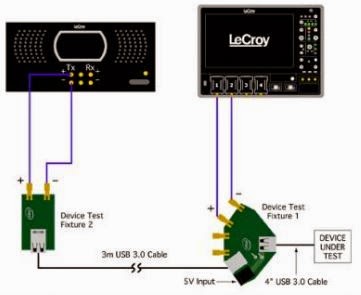
A representative transmitter compliance test setup
Figure 1: A representative transmitter
compliance test setup
In the first post in this series, we looked at some of the basics of USB 3.0 and 3.1 compliance test and covered the USB-IF's role in overseeing the protocol. Now, let's look into some aspects of physical-layer test.

16 January 2015

Plan For Successful USB Compliance Testing (Part I)

The coveted USB 3.1 logo
Figure 1: The coveted SuperSpeed USB logo
Certifying a device's implementation of a serial protocol standard is a fairly complex process involving a number of levels: electrical test, interoperability, backward compatibility, link layer, and so on. Generally, some organization oversees a given protocol, managing the revision process for the protocol itself as well as the testing process that a product must undergo. Passing the relevant compliance test suite and having a valid Trademark License Agreement on file bestows the prized right to display the protocol's logo on the product's box (Figure 1). That logo's presence tells the product's users that their device's serial interface operates within parameters set by the overseeing organization.