You need to test, we're here to help.

You need to test, we're here to help.
Showing posts with label alternate modes. Show all posts

06 June 2022

What Happens When You Connect a USB-C Cable

The USB Type-C® connector is designed to be very simple for the user to use: you insert it in either orientation, and a multitude of services just “work”. Though simple to use, it is a complicated connector to program and test, with a very complex system of protocols behind it. There is USB power delivery (USB-PD) and multiple rates of USB data delivery from USB 2.0 through USB4®, specified by the USB Implementers Forum (USB-IF®). There are protocols other than USB, such as DisplayPort™, High-Definition Multimedia Interface (HDMI™), Peripheral Component Interconnect Express (PCIe®), Base-T Ethernet and Thunderbolt™. 

So, what actually happens when you connect a USB-C cable? To understand that, first let’s take a look at the signals and pin assignments in the USB-C connector receptacle (Figure 1).
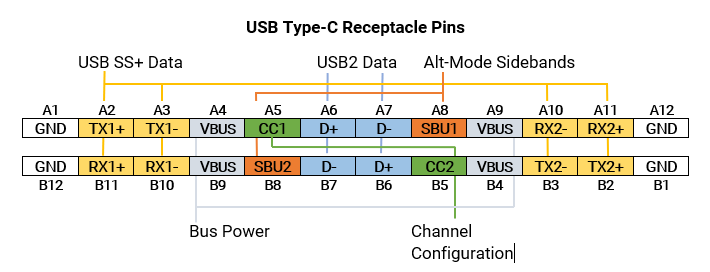
Figure 1: The USB-C receptacle pin assignments showing the key signals used for device-to-device communications. Related pins have matching color overlays.

Figure 1: The USB-C receptacle pin assignments showing the key signals used for device-to-device communications. Related pins have matching color overlays.

13 December 2021

USB4 Alt-Mode Testing: DPAUX and USB-PD

Figure 1: The interfaces that make up the USB-C connector and their relationships.

The USB Type-C® (USB-C) connector supports not only USB data transfers at speeds of up to 20 Gb/s but also can be reconfigured to support a wide variety of other interfaces through the USB4 provision for alternative (Alt) modes. The Alt-Mode protocols supported include Thunderbolt™, Mobile High-Definition Link (MHL), Peripheral Component Interconnect Express (PCIe®), High-Definition Multimedia interface (HDMI®) and DisplayPort™ (DP).

The diagram of the USB-C receptacle in Figure 1 shows where it potentially switches from normal operation into Alt-Mode.

06 December 2021

Testing DisplayPort 2.0 vs. USB4 Over USB Type-C Connectors

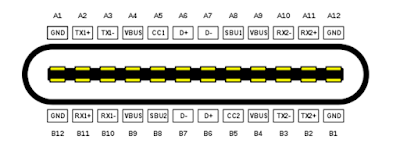
Figure 1: The pin out of the USB Type-C connector.

DisplayPort™ 2.0 (DP 2.0) is a high-resolution video interface and USB4® is a high-speed data interface; what they have in common is the USB Type-C® (USB-C) connector. While DP 2.0 can also be deployed on the standard DisplayPort as well as mini-DisplayPort connectors, it is the USB-C connector that really excites electronics manufacturers because now they can use a single connector for high-speed data, high-resolution video and even power distribution. 

Figure 1 shows the pin assignments for a USB-C connector, which is a mechanically reversible connector that includes four, high-speed differential data lines: TX1, TX2, RX1 and RX2.

In USB4 operations, the four data lines TX1, TX2, RX1 and RX2 form a dual-lane, duplex signal path, supporting 10 and 20 Gb/s transfers on each line. When operating in USB4 Alt mode, up-to-four of these buses can be reassigned to become four DP 2.0 video lanes, which operate at 10, 13.5 or 20 Gb/s.

Testing for both interfaces over the USB-C connector is similar, but there are some notable differences.

01 February 2016

USB Type-C Cable Detection

The four possible states of connection for a USB Type-C cable
Figure 1: The four possible states of
connection for a USB Type-C cable
Having examined some of the basics regarding the USB Type-C connector and the Power Delivery 2.0 specification that complements the Type-C spec itself, we'll turn our attention to the topic of cable detection. The Type-C connector is reversible, which is to say there are four ways a cable can be connected between upstream- and downstream-facing ports (Figure 1). Not only that, but there are different types of Type-C cables. So how do the devices discern what's between them?

05 January 2016

A Look at USB Type-C and Power Delivery

The USB Type-C connector alongside its Micro-B counterpart
Figure 1: The USB Type-C
connector alongside its
Micro-B counterpart
With USB 3.1, the latest iteration of the serial-data protocol, comes a new smaller and universal connector: USB Type-C, the USB-IF's answer to Apple's Lightning connector (Figure 1). Even Apple itself has adopted USB Type-C for its latest MacBooks, a rare show of support from Cupertino for an open standard. Like Lightning, USB Type-C is reversible, but it offers other interesting features, such as the ability to handle other protocols using "alternate modes." It also incorporates the new USB Power Delivery specification for improved power-supply capabilities over USB.