
 |
| Figure 1: WaveStation software enables full remote control of an oscilloscope from a Windows PC |
16 January 2014
Mr. Oscilloscope, Meet Mr. Computer

08 January 2014
Let's Get Serial: About Manchester Data Encoding
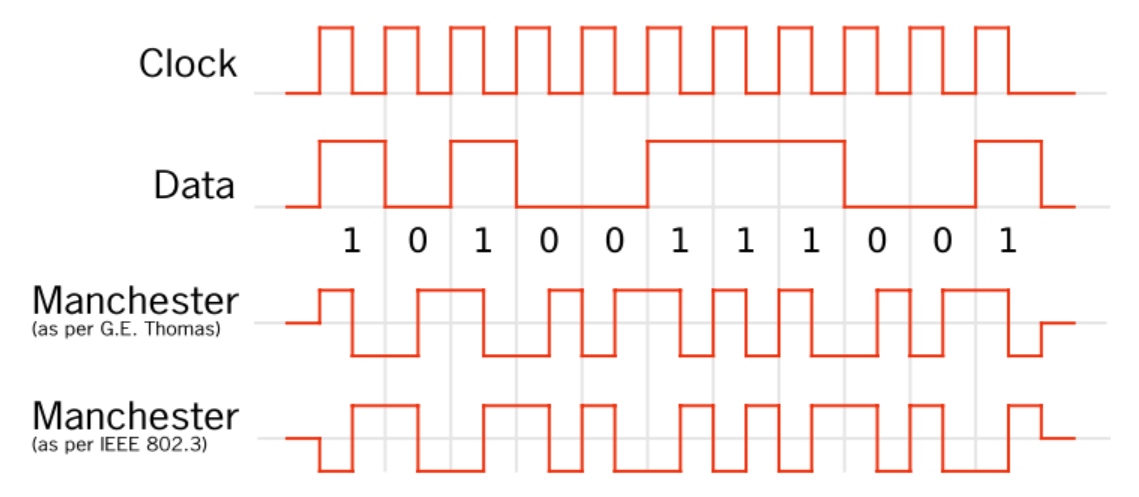 |
| Figure 1: An example of Manchester coding |
23 December 2013
Back to Basics: Jitter
 |
| Figure 1: Jitter is short-term variation of a signal with respect to its ideal position in time |
18 December 2013
Oscilloscope Basics: Trigger Holdoff
As discussed in an earlier post, triggering is the means by which we can coax an oscilloscope into showing us what we're looking for in an input signal, and indeed even simply to display it in a stable fashion. Two of the most basic triggering types are edge triggers and pattern triggers. The latter applies to mixed-signal instruments, allowing users to trigger on a logical combination of analog and digital inputs.
12 December 2013
Back to Basics: Probes (Part IV)
 |
| Figure 1: An example of differential probes measuring from test point to test point. |
04 December 2013
Back to Basics: Probes (Part III)
 |
| Figure 1: Active oscilloscope probes sport high resistance and low capacitance at their tips, but terminate into a scope's 50Ω input. |
27 November 2013
Video: Zooming In On Waveforms
Many modern oscilloscopes offer the ability to zoom in on select portions of a waveform trace, allowing users a much more detailed look at whatever anomalies may (or may not) be present. Zooming is a handy feature on any oscilloscope, but it's even handier if you happen to be using a Teledyne LeCroy HDO. These instruments bring 12 bits of vertical resolution to the table for even more detail and cleaner, crisper waveforms than any legacy 8-bit oscilloscope.
So, without further delay, here's a short tutorial video on how to implement zoom traces on an HDO.
So, without further delay, here's a short tutorial video on how to implement zoom traces on an HDO.
Subscribe to:
Posts (Atom)